
EA SPORTS™ College Football 27
Accessibility Resources

Welcome to EA SPORTS™ College Football 27, where the passion, tradition, and intensity of college football come together across all 138 FBS programs. Whether you're chasing a National Championship, building a long-term Dynasty, or creating your own legacy in Road to Glory, there are countless ways to experience the game.
To help players get started, College Football 27 includes a variety of options designed to support different skill levels, playstyles, and accessibility needs. Gameplay difficulty settings, adjustable sliders, and various gameplay adjustments allow players to customize the experience to match their preferences. New players or those looking to refresh their skills may find Practice and the Skills Trainer useful for learning mechanics, experimenting with strategies, and becoming familiar with game controls before jumping into competitive action.
Accessibility options are available from the start of the game and can be adjusted at any time. Features such as Menu Narration, Colorblind Filters, and Camera Shake controls help support a wider range of player needs and preferences. Additional settings for UI readability, gameplay assists, passing, catching, and game pacing provide further opportunities for customization. Players can also fine-tune gameplay using five difficulty levels and a comprehensive suite of Player and CPU AI sliders, allowing for an experience that feels both comfortable and rewarding.
Important Information: Please note that this information is based on the US, English version for PC, PS5 and Xbox Series X|S consoles only. For more information about the game, patch notes, and news, visit the official website.
Noteworthy Features
Visual


User Interface
- Enlarge On Field Graphics option can be toggled On or Off to make gameplay icons appear larger than their default value.
- Button prompts can be additionally turned On using the Defensive Pass Coverage Visual Assist and the Receiver Visual Assist options.
- On Field Trainer can be turned to On, Off, or to Dynamic to provide hints during gameplay either all the time or by adapting to player-skill and play-style. These will appear in the upper left-hand corner.
- On-field visual feedback can be enabled to provide additional information during a game about passing, catching, tackling, and pass rushing.
Visual Effects & Display
- Motion blur can be set to allow or disable motion blur effects in the game
- Colorblind filters are provided for Protanomaly, Deuteranomaly, and Tritanomaly color blindness as full-screen solutions.
- Brightness sliders are provided to adjust the game’s overall brightness to five different preset values.
- Contrast sliders are provided to adjust the game’s overall brightness to five different preset values.
- Chromatic Aberration is not present in this game by design with the exception of certain loading screens.


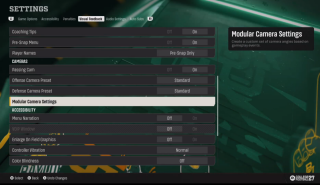
Modular Camera Settings
- Modulator Camera Settings allow players to create a custom set of camera angles based on gameplay events such as Preplay, Coach Cam, Dropback, Carry Ball, Run Zoom, Pass in the Air, User Scores Touchdown, Kick, Kick in the Air, and Postplay.
Audio
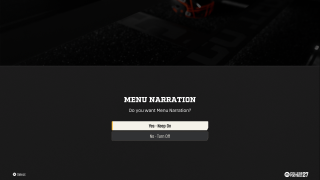

Audio Settings & Narration
- Volume sliders can be separately adjusted for a plethora of sounds including master volume, in-game commentary, band music, stadium speakers, crowd volume, on the field sounds, music, menu SFX, and more!
- Surround sound can be chosen from the audio mix presets.
- Menu Narration is available to toggle on or off and is presented to the player during boot flow. It also includes its own volume slider to adjust narration volume.
Controls
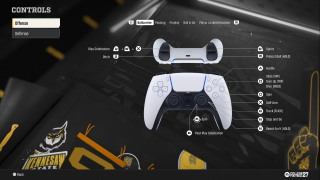


Input Settings
- Controller vibration can be adjusted to off, normal, or assist mode.
- Kicking control scheme can be selected between a Tap and Hold or Tap and Tap when controlling accuracy and power during kicks.
- Passing Type can be chosen between Placement, Placement & Accuracy, Classic Passing, and Revamped Passing. Each option provides different levels of accuracy and timing required by players.
- Remapping options are not present, however complete control schemes are available for reference at any time
Player Control
- Cameras are automatic and do not require player inputs to control. Players can change between 3 zoom angles during Pre-Play, if preferred, via down on the D-Pad on your controller.
- Automatic movement guidance can be turned On via Defensive Assists that will help steer players in the appropriate direction during certain gameplay scenarios.
- Coach Mode can be toggled On or Off, along with an Auto Quarterback option which will cause the Quarterback to automatically throw the ball if no input is used after the play begins.
- AI WR For User Teams can be toggled on or off, which will have the AI attempt a catch if the user does not give any input.
- Timing Based Catching Mechanics can be turned OFF
- Passing Slowdown option affects the amount of slow down that will occur during a pass. It can be set to off, slight, moderate or max. Please note that this option is not available during online play.


Gameplay


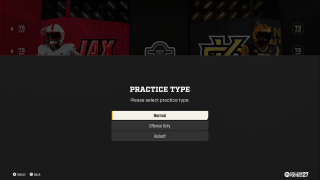
Guidance & Progression
- Training modes like the Skills Trainer, Mini-Games, and Open Practice provide opportunities to learn how to play the game and practice in a consequence-free environment, these can be accessed via the Main Hub.
- Objectives are tracked throughout gameplay modes such as Road to Glory and Dynasty.
- Pausing is possible during singleplayer modes, but is not available during non-interactive scenes and is limited in multiplayer.
- Saving is robust in single player modes, where auto-saves are frequent after important milestones and manual saves can be made at any time from the HUB.
Difficulty & Affordances
- Difficulty Levels are provided and can be changed from Freshman (easiest), Varsity, All-American, and to Heisman (most difficult). Once in gameplay, the difficulty levels cannot be changed.
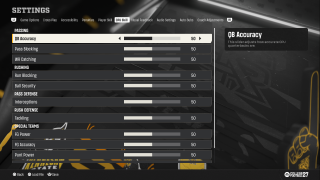
- AI Adjustments can be altered for both Player Skill and CPU Skill. The options cover nearly every aspect of the game from QB Accuracy to Kickoff Power.
- Penalties are customizable by their frequency or by removing them completely.
- Gameplay Adjustments for elements like wear and tear, game length, clock speed, injury frequency, fatigue, and player parity are also available.



Multiplayer Considerations
- Quick Chat text selection is available during multiplayer modes. Messages received can be voiced by Text-to-Speech options.
- Convert Incoming Voice to Chat Text including a customizable VOIP to Text Menu where its opacity and location can be adjusted.